A DITO prepaid user can share ₱5 to ₱1,000 of load per transfer, up to five times a day, at no charge, according to DITO's help center FAQ. Data can be shared the same way, at least 50MB at a time. The catch is where you do it. DITO names only two places: the DITO App and your MyDITO account.
This guide covers how to pasaload DITO to DITO, the limits that trip people up, which promo data you cannot share, and who to contact when a transfer goes wrong.
DITO pasaload rules at a glance
Everything below comes from DITO's FAQ, under its "Load & Data Sharing" section:
- Fee: none. DITO says you can share load and data "for free".
- Load per transfer: ₱5 minimum, ₱1,000 maximum.
- Data per transfer: 50MB minimum. There is no fixed maximum: DITO says you "may share as much as you want as long as you have enough data."
- Daily limit: a maximum of 5 load transactions a day, and a maximum of 5 data transactions a day. DITO states each limit in a separate answer and does not say whether they are counted together.
- Balance rule: you must keep a maintaining balance of ₱1. You cannot send all of your load.
- Shared data validity: 48 hours.
- Who can receive: another DITO subscriber.
How to pasaload DITO to DITO, step by step
DITO's FAQ says you can share load and data "via your DITO App or MyDITO account". It does not print screen-by-screen instructions, so these steps follow only what DITO's own pages describe:
- Check what you have. DITO says you can view your remaining data allowance in the DITO App or MyDITO. For load, remember the ₱1 you must leave behind.
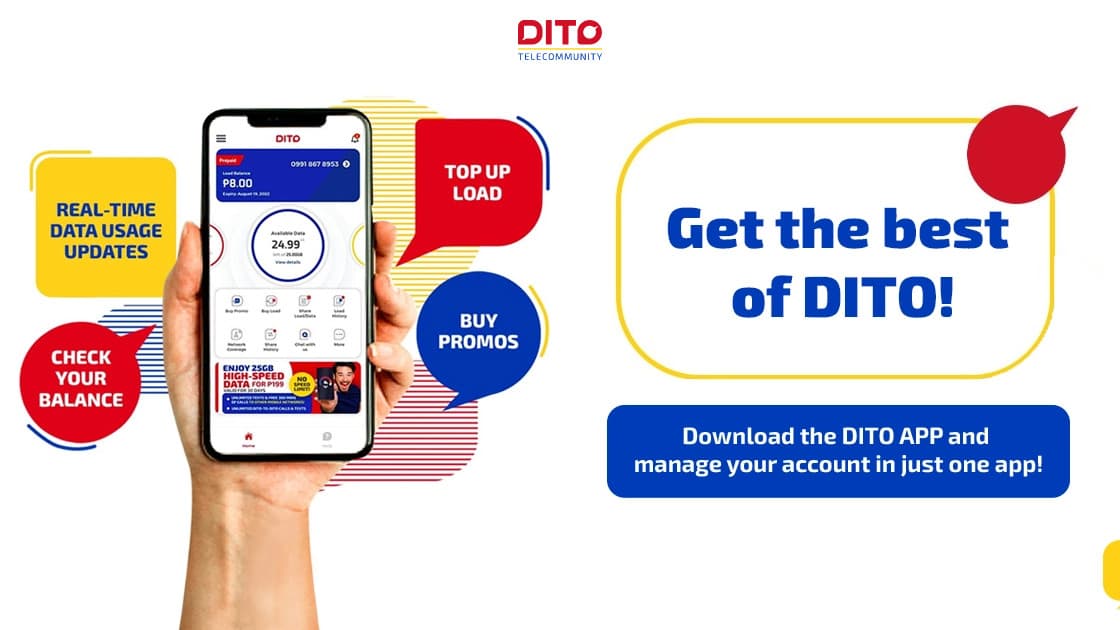
- Open the DITO App and log in. The DITO App page lists "Share load with your DITO friends" among the app's features. On a computer, use MyDITO instead: DITO's guide to topping up online says you can use MyDITO on a desktop or laptop computer.
- Choose the DITO number you are sharing with, then enter the amount: ₱5 to ₱1,000 of load, or at least 50MB of data.
- Confirm and wait for the notice. The DITO App page says you "get in-app notifications when you buy & share a load or promo."
- Tell the receiver to use shared data soon. It is valid for 48 hours.
The same app page says you can "view your load and promo availment history", which helps if you need to check a transfer later.
Paano mag-pasaload sa DITO SIM?
Use the DITO App, or your MyDITO account on a computer. Pick the DITO number, enter ₱5 to ₱1,000 of load (or at least 50MB of data), and confirm. It is free, up to five times a day, and at least ₱1 of load must stay on your own SIM.
How much load can you actually send?
The ₱1 maintaining balance changes the numbers more than people expect. By our math, using DITO's published limits:
- The smallest share needs ₱6. Sending the ₱5 minimum while keeping ₱1 means you need at least ₱5 + ₱1 = ₱6 of load.
- ₱100 of load lets you send ₱99, not ₱100 (₱100 − ₱1).
- The most you can send in a day is ₱5,000: 5 transactions × ₱1,000. Sending ₱5,000 also needs ₱5,001 of load, because the ₱1 must remain.
If someone needs more than that, they can buy load directly, as explained further down.
Which DITO data you can share, and which you can't
Not every promo's data can be passed on. DITO answers this promo by promo in its FAQ and help center:
| Data from | Can you share it? |
|---|---|
| DITO Level-Up Packs | Yes |
| DITO Auto Pay subscription | Yes |
| Level-Up Socials 299, 399, 499 and 599 | All-access data only; app-based data can't be shared |
| Level-Up Socials 20, 50 and 70 | No, neither all-access nor app-based data |
| NEW DITO Data Sachets | No, the all-access data isn't shareable |
| PISO Data | No |
| DITO Starter Pack data | No |
DITO's StreamZone page adds one more: StreamZone subscribers can share the bonus all-access data with fellow DITO users.
The pattern: data you bought as a regular pack is generally shareable, while freebies, sachets and app-only data mostly are not. If a share fails, check which promo the data came from first.
How long shared data lasts
Shared data is valid for 48 hours, DITO says. That is much shorter than a typical 30-day pack, so share it close to when the other person needs it.
There is one helpful rule. If someone receives new shared data while they still have shared data left from an earlier transfer, DITO says "the validity of your total shared data will be extended for another 48 hours." A second, small share can therefore keep a larger earlier one from expiring.
Can you pasaload from DITO to Smart, Globe or TM?
DITO's FAQ describes sharing only with "another DITO subscriber". It lists no way to send load or data to Smart, TNT, Globe or TM numbers.
If your family is on Smart or TNT, sharing works inside that network instead. Our guide on how to pasaload on TNT and Smart covers those codes and fees.
For a DITO user who runs out of load and has no DITO friend nearby, DITO's help center lists other places to buy load and promos: the DITO App, DITO Experience Stores, partner retail stores, Lazada and Shopee. In the app, the DITO App page says you can pay with a debit or credit card, your load balance, points, or GCash, GrabPay, Maya, ShopeePay or WeChat.
Can you share DITO data via text or without the app?
DITO's FAQ names only the DITO App and MyDITO for sharing. We found no text (SMS) code for sharing on DITO's FAQ pages, so treat any code you see online with caution.
Without the app, the option DITO describes is MyDITO on a desktop or laptop computer. If you are setting up a new DITO line first, our guide to getting an eSIM on Globe, Smart or DITO covers that part.
If a share does not arrive
First, check the basics against DITO's rules: the amount was between ₱5 and ₱1,000 (or at least 50MB), you had not already made 5 transfers that day, and the data came from a shareable promo.
If it still did not go through, note the receiver's number, the amount and the time. Then contact DITO through the support channels listed on its FAQ:
- DITO hotline 185
- Email: customerservice@dito.ph
- Live chat on the DITO website
- The DITO Facebook page
Keep the in-app notification for the transfer, if you received one. It is the quickest proof of what was sent and when.