Moving your number to DITO is free and, at a DITO store, takes about 24 to 48 hours. You keep your Globe, TM, Smart, TNT or GOMO number, but you first need a 9-digit Unique Subscriber Code (USC) from your current network, and it expires 15 days after it is issued, according to DITO's porting page.
Steps and rules checked against DITO's and Smart's own help pages, November 2026.
How to port your number to DITO: the short answer
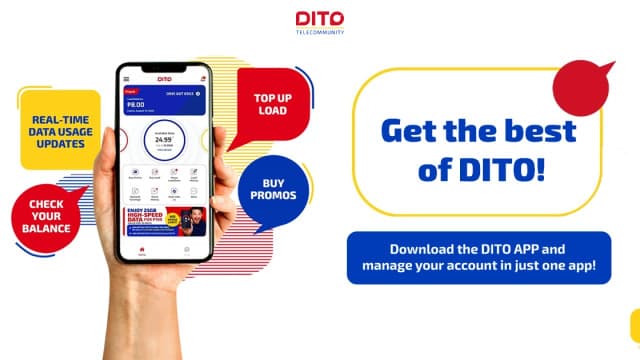
Get your USC from your current network. Then either visit a DITO Experience Store with the USC and one valid ID, or order a free DITO SIM in the DITO App and start the port when it arrives. Your number moves to the new SIM in about 24 to 48 hours. Porting itself is free; the app route only charges for delivery.
Mobile Number Portability (MNP) is the service that lets you keep your number when you change networks. It comes from Republic Act 11202, the Mobile Number Portability Act, which requires telcos to provide it "completely free of charge" and caps the whole porting process at 48 hours.
Can you port? Check these first
DITO's porting page lists who qualifies. Your number must:
- be active;
- have no unpaid balance with your current network;
- not be tied to a phone that is locked to your current network;
- not be part of a bundled product or service from another network;
- not have had another porting request in the last 60 days;
- have been activated more than 60 days ago (newly activated numbers can't be ported);
- not be the principal number of a multi-number account;
- not be blocked from porting by a court, or blacklisted for fraud.
You also need a phone that works on DITO and to be inside DITO's coverage area. DITO's FAQ warns that calls and texts are not guaranteed on a phone that is not DITO-ready for VoLTE (Voice over LTE, which carries calls over the 4G data network). Check your model on DITO's VoLTE page before you start. DITO's FAQ also says that once a store port request is started, DITO can't withdraw it.
How to get your USC from Globe, Smart, TNT or GOMO
The USC proves your number is eligible to leave. You ask the network you are leaving for it, not DITO.
| Leaving | How to get the USC | Where it says so |
|---|---|---|
| Globe or TM | Text USC to 5050 and follow the replies, or visit a Globe Store | DITO's FAQ (text route); Smart's help page (store route) |
| Smart or TNT | Visit a Smart Store | DITO's FAQ |
| GOMO | Chat with a GOMO agent on the GOMO PH website or app | Smart's help page |
For Globe, the two official pages give different routes. DITO's FAQ says to text "USC" to 5050, while Smart's help page, updated in October 2026, says to visit any Globe Store. If the text doesn't return a code, go to a Globe Store. Globe's own MNP page would not load for us when we checked, so we couldn't confirm which route Globe now prefers.
Whichever network you are leaving, the code is valid for 15 days. If it expires, you request a new one.
Option 1: Port your number at a DITO Experience Store
This is the faster route, and the only one DITO lists for porting into a postpaid plan. The steps, from DITO's porting page:
- Get your USC from your current network.
- Go to a DITO Experience Store and say you want to apply for MNP.
- Show one valid ID and your valid USC.
- The store checks your eligibility and processes the request.
- You get a free DITO SIM for your number, plus a DITO Bonus SIM. DITO says the Bonus SIM has 1GB of data, unlimited DITO-to-DITO calls and texts, and unlimited texts and 100 minutes of calls to other networks, valid for 7 days.
- Activation takes about 24 to 48 hours. When it is done, DITO sends an onboarding email with the activation steps.
During activation you may lose calls, texts and data, but DITO says the interruption should not last more than 4 hours. The Bonus SIM is there so you can still call and text in that gap.
Option 2: Port your number through the DITO App
DITO's FAQ lists eight steps for the app:
- Open the DITO App and tap "Switch DITO with your old number".
- Enter your application details, including your USC.
- Confirm the delivery address and pay the delivery fee shown in the app. The SIM itself is free.
- Wait 2 to 5 business days for the free DITO SIM to arrive. DITO says it comes with 1GB of data for 7 days, plus a Bonus SIM.
- When it arrives, open the app and tap "Order Received, start the porting process".
- Type in or scan the SIM's barcode so the app can check the ICCID (the SIM's serial number).
- Wait for the notice that your application was submitted for validation. Activation takes about 24 to 48 hours.
- Watch for the onboarding email with the activation steps.
One detail to know: DITO's FAQ marks part of the Bonus SIM offer (the texts and minutes to other networks) as available only to people who port in through "offline channels", meaning a store.
How long porting to DITO takes
By our math from DITO's stated times:
| Route | Waiting for the SIM | Activation | Total, roughly |
|---|---|---|---|
| DITO Experience Store | None, you leave with it | 24 to 48 hours | 1 to 2 days |
| DITO App | 2 to 5 business days | 24 to 48 hours | about 3 to 7 business days |
With the app, your 15-day USC still has room to spare even with the slowest delivery. Don't request the code weeks before you are ready, though.
If your old network finds an unpaid balance, the switch waits until you settle it. DITO says that delay should not go past 3 working days, which matches the 3 working days the law gives you to pay.
Paano ilipat ang number sa SIM ng DITO?
Get a USC from your current network first. Then bring it and one valid ID to a DITO Experience Store, or order the free SIM in the DITO App. Your old number starts working on the new DITO SIM about 24 to 48 hours after the port is submitted, and you pay no porting fee.
Porting to DITO Postpaid
The steps above put your number on DITO Prepaid. If you want a postpaid plan instead, DITO's postpaid page says you can port a prepaid or postpaid number from another network into DITO Postpaid, but only when you apply at a DITO Experience Store; porting through the app is not yet offered for postpaid. That page also says you will have to register your SIM again after porting.
What happens to your promos and bank apps
- Promos and plans don't move. DITO's FAQ says you can't keep your old network's promos, subscriptions or plan. Use up any load or data first.
- Bank and e-wallet apps keep working. DITO says your number "should run normally" with banking apps it is linked to, and names Landbank and Maya as examples.
Once you are on DITO, you can share load with other DITO users; our guide to DITO-to-DITO pasaload covers the limits and fees. If you'd rather not wait for a physical SIM, see how eSIMs work on Globe, Smart and DITO.
If your port is rejected or you change your mind
DITO notifies you by app, text and email if your application fails the eligibility check. Its FAQ lists the usual reasons:
- the USC is invalid, expired or doesn't match your number (ask for a new one);
- another port request for your number is still pending;
- you still owe your old network money;
- your phone is locked to your old network;
- the number was activated less than 60 days ago.
You can reapply once the problem is fixed. To follow up, check the DITO App, use the live chat on DITO's website, or email customerservice@dito.ph. DITO's pages give its 24/7 hotline as 186, though some FAQ answers still say 185. One FAQ answer says you can ask the hotline to cancel an MNP application, even though the store section says a started request can't be withdrawn, so call before you submit if you are unsure.
To leave DITO later, you can request your USC in the DITO App, according to Smart's help page. The 60-day rule applies again: you can only port the same number once 60 days have passed since the last port was completed.