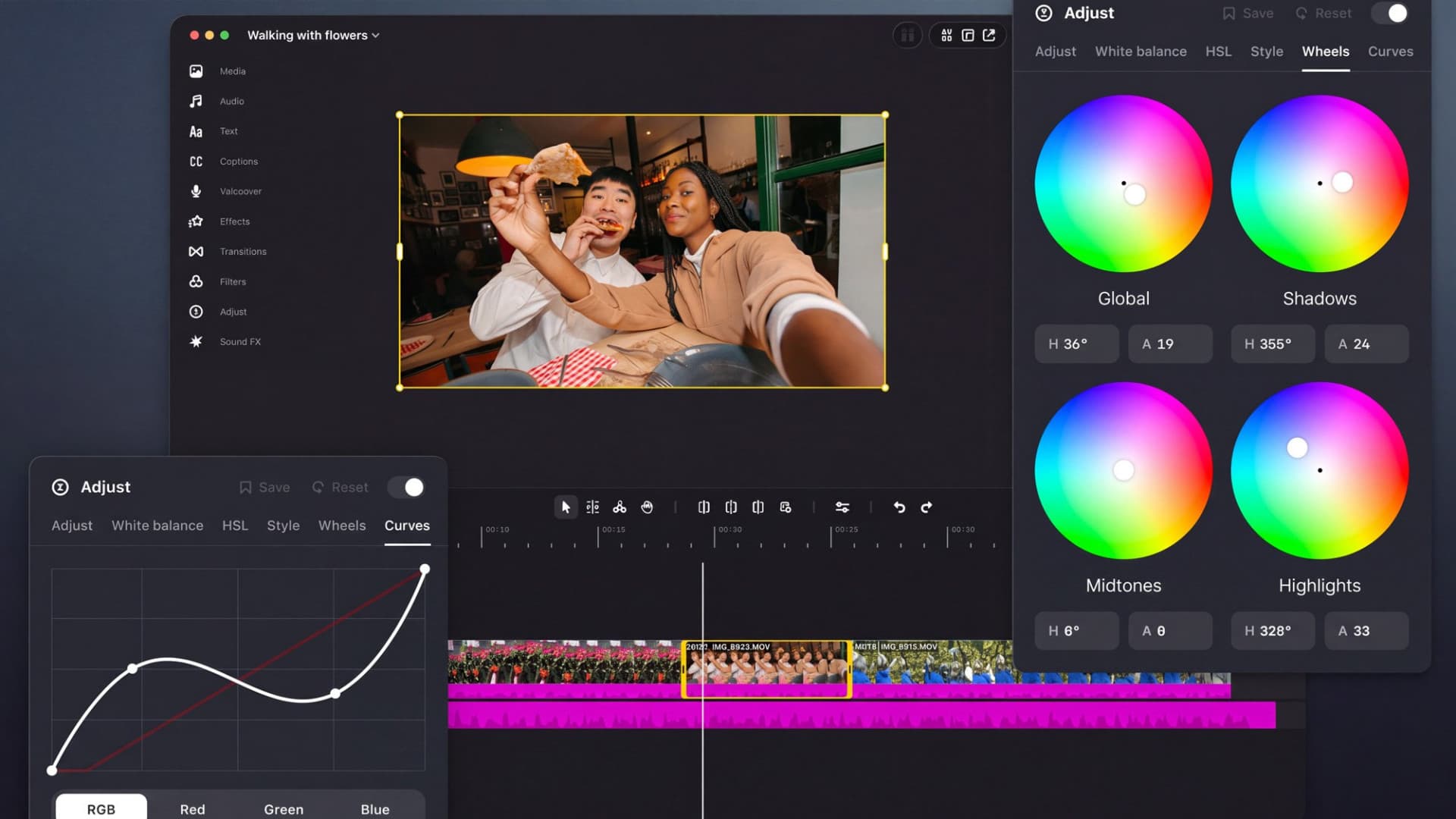
Filipino creators who cut Reels on a Mac now have a free editor that exports 4K video with no watermark. Instagram released Edits for Mac on November 5, while Apple's own Final Cut Pro costs ₱19,990 on the Philippine Mac App Store.
Edits started as a phone app. Brett Westervelt, who leads Edits, announced the desktop version on Instagram's Edits blog and said 50 million people have used Edits in just over a year. The Mac app is the "first version", and Instagram plans to update it every week.
What Edits for Mac can do
The desktop editor is built for longer projects that are hard to manage on a phone screen. According to Instagram and MacRumors' launch report, it includes:
- A multi-track timeline, so you can stack several video and audio clips
- Keyframes (markers that change an effect over time) for smooth transitions
- Audio waveforms, which show the shape of the sound so you can cut on the beat
- Color tools: color wheels, curves and log conversion (turning flat "log" camera footage into normal-looking color)
- Import of your own LUTs (preset color looks) and font files
- Instagram's licensed and royalty-free music library, plus hundreds of sound and video effects
- Unlimited automatic captions in several languages
- Keyboard shortcuts you can set yourself or bring over from another editor
- Horizontal and vertical aspect ratios, and 4K export with no watermark
Finished videos can go straight to Instagram with tagging, location and trial reels, 9to5Mac reported, or be exported for YouTube, TikTok or personal use. Audio and text styles saved in the phone app already appear on the Mac.
AI agents through MCP
Instagram says you can connect AI agents to the editor through MCP (Model Context Protocol, a standard way for AI assistants to use another app's tools). You switch it on in Settings, iClarified reported, citing Edits product lead Matthew Simari's comments to The Verge. In Meta's example, a creator asks Meta's Muse agent to build a rough cut from clips in a Downloads folder, then opens the project in Edits to finish it by hand.
One catch for local users: Muse launched in the US first, as we covered when Meta announced it, and we have not found an official Meta announcement bringing it to the Philippines. Instagram describes MCP as open to other agents, so Muse is not the only option.
Requirements and what is missing
Instagram's Edits desktop page lists the basics:
- Mac only. There is no Windows version.
- Apple silicon, M1 or later. Intel Macs are not supported.
- An Instagram account to sign in.
- Free to download.
The Mac app is a direct download from Instagram's site, not a Mac App Store app. The page lists no country limits, and it offered the installer (version 454) when Clurky opened it from the Philippines on November 6.
The page says "M1 or later" and does not mention the MacBook Neo, which runs Apple's A18 Pro phone chip. If you bought one, including through the DepEd MacBook Neo deal, check that the installer runs before you plan a project around it.
You also cannot edit the same project on your phone and your Mac yet. TechCrunch reported that Instagram is working on it.
How the price compares in the Philippines
Edits is aimed squarely at CapCut, which has had Windows and Mac apps since 2021. These are the prices listed on the Philippine App Store on November 6:
| Editor | Price in the Philippines | Mac requirement |
|---|---|---|
| Edits for Mac (Instagram) | Free | Apple silicon (M1 or later) |
| CapCut (ByteDance) | Free; Pro Monthly ₱480, Standard Monthly ₱250, Standard Yearly ₱1,520 | macOS 10.14 or later |
| Final Cut Pro (Apple) | ₱19,990 one-time | macOS 26.6 or later |
By our math, a year of CapCut's Pro Monthly plan costs ₱5,760 (₱480 x 12), and Final Cut Pro's ₱19,990 equals about 42 months of that plan (₱19,990 / ₱480). Edits costs nothing upfront. This compares listed prices only, not features: Final Cut Pro is a professional editor with tools Edits does not claim to match.
The phone version is already local. The Philippine App Store listing for Edits shows it as free and lists Tagalog among its app languages. Instagram has not said which languages the Mac app's menus support.
Who it suits
Edits for Mac fits creators who already post Reels from an Apple-silicon Mac and want a bigger timeline without paying for software. Those on Windows still need CapCut or another editor. Anyone who edits on both phone and laptop should wait for cross-device projects, which Instagram says are coming in a later update.