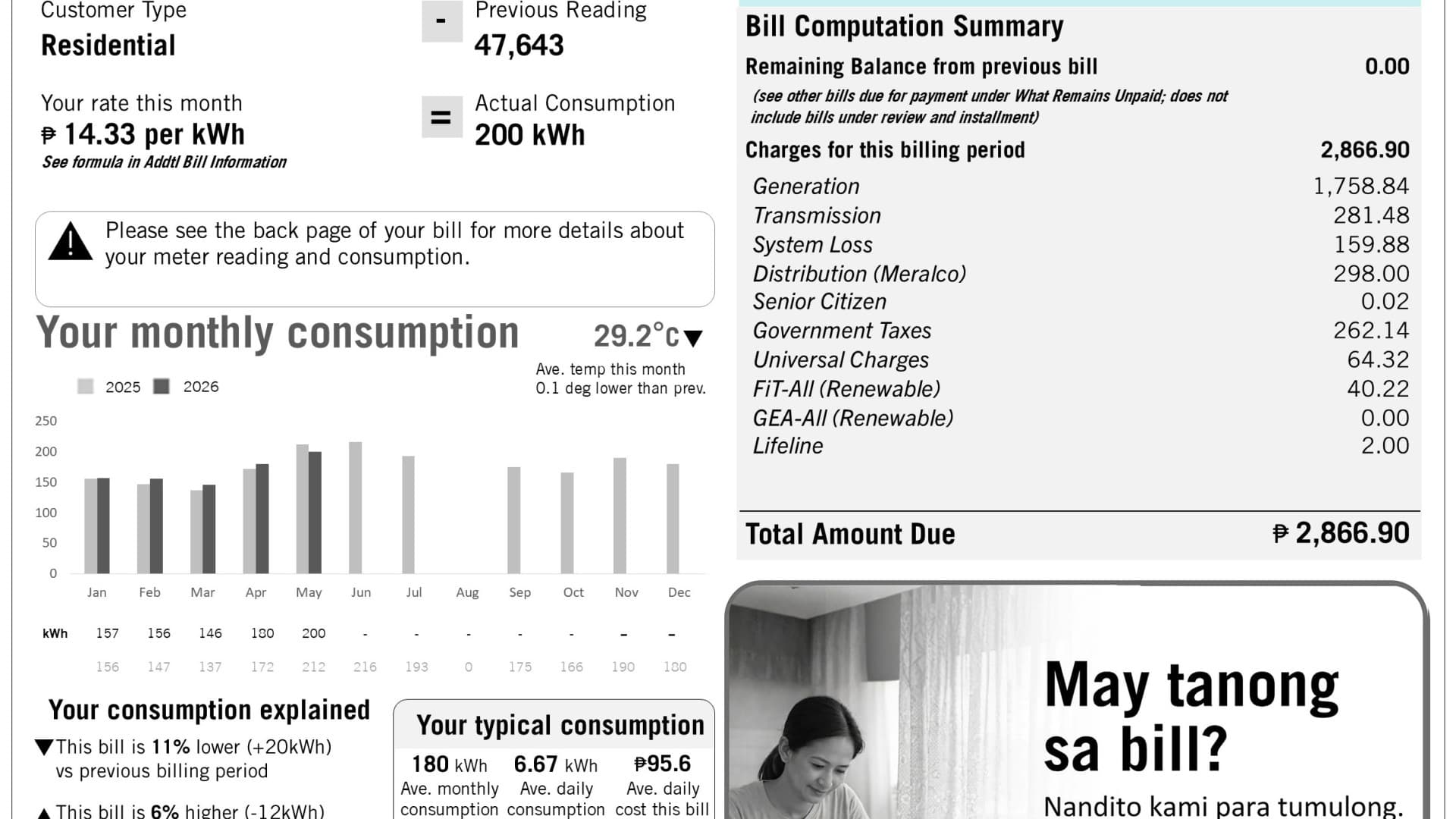
A free My Meralco account gives you PDF copies of your last 13 months of electric bills, according to Meralco's billing FAQ. That matters more than usual this month. Meralco's overall residential rate for October 2026 is ₱15.0615 per kWh, up ₱0.3191 from September. By our math, a home using 200 kWh is looking at about ₱3,012 (200 × ₱15.0615), before the exact line items on each bill.
The short answer to the question most people search: you can pay a Meralco bill online without an account, but to see your bill online you need My Meralco. Here is how both work, and where the fees and delays hide.
First, find your 10-digit CAN
Your Customer Account Number (CAN) is the key to almost everything. Meralco describes it as a 10-digit permanent number that does not change every month.
- Where it is: on the top right of your paper bill, above the Account Summary table, or in the PDF bill inside My Meralco.
- When you need it: for paying through Meralco's partner channels (banks, Bayad, e-wallets). You need all 10 digits.
- When you don't: paying inside My Meralco itself.
- Not for outages: to report a brownout, Meralco asks for your Service ID Number, not the CAN.
Lost the bill? Meralco's 24/7 hotline is (02) 16211, and the company's help page tells callers to have the CAN ready.
Can you check a Meralco bill online without an account?
Not the bill itself. Meralco's FAQ lists only one no-account option, and it is for paying: Pay as Guest. For it you need an email address, your payment details, and the reference numbers from your bill (Account Number, Service ID Number or Invoice Number). The FAQ's steps are short:
- Have your latest bill ready.
- Open the Pay as Guest page.
- Enter the details and agree to the terms.
- Choose a payment method.
- Review and submit.
Meralco does not describe a guest page that shows your bill or amount due. Viewing bills, payment history and automatic payments are the extras an account adds. So if you only have your CAN and want to know how much you owe, make the account or call the hotline.
Paano mag-check ng Meralco bill online?
Create a free My Meralco account, enroll your electric service with the details on your bill, then open View Bills. That is the only way Meralco offers to see the bill itself online. Each step is explained below.
How to see your bill in My Meralco
Meralco Online has been renamed. The App Store listing now opens with "Meralco Online is now My Meralco!", and the same account works on the website at mymeralco.com.ph.
- Download My Meralco from the App Store or Google Play, or use the website.
- Create an account. Sign up for free, or if you had a Meralco Online account, Meralco says to log in with those existing credentials.
- Enroll your electric service using the details on your bill.
- Open View Bills. You get bill summaries plus PDF copies of up to 13 months of electric bills, and monthly kWh tracking.
One catch: the PDF starts with the next billing after you enroll. If this month's bill is missing, it is not an error. You'll have to wait one cycle.
Switch to paperless billing
Online billing still sends paper bills. To stop them, Meralco's paperless billing page lists four steps:
- Sign up to My Meralco and log in.
- Tap Paperless Billing in the menu or dashboard.
- Tap Switch to Paperless and submit the requirements.
- Wait for the confirmation by email or SMS.
The service is free. Meralco says the e-bill is usually ready within a day after your meter is read. Two things to know before you switch:
- Name mismatch: if your My Meralco name differs from the name on the bill (a renter, or a bill still under a parent's name), you need extra papers, such as a valid ID number and an authorization letter.
- Six-month lock: you can download or print bills anytime. But changing back to paper delivery is only possible six months after paperless takes effect.
Ways to pay, and when your payment posts
Posting time matters if a bill is close to its due date or you are waiting for a reconnection. Meralco gives these windows:
| Channel | Account needed? | When the payment posts |
|---|
| My Meralco | Yes | Real time, 7:00 AM to 10:59 PM daily |
| Pay as Guest | No | Online payments from 7 AM to 11 PM post right away; later ones post the next morning |
| Bayad (website or app) | No, but you need the latest bill's details | Real time, 7:00 AM to 6:59 PM |
| Bayad branches (over the counter) | No | Next day |
| E-wallets | No, but you need your CAN | Next day, unless the wallet is marked real-time (7:00 AM to 9:59 PM daily) |
Meralco lists 25 e-wallet partners, among them GCash, Maya, Shopee, Coins.ph, PalawanPay and Home Credit. Online card payments accept Mastercard, Visa and JCB credit, debit or prepaid cards.
Two more rules from the FAQ: Bayad accepts overdue bills as long as your service is not yet disconnected. Some bills cannot be paid online at all, including bills under complaint.
Check for a convenience fee before you pay
Meralco says some payment methods add a convenience fee on top of your bill. Its e-wallet page lists one example: Justpay.io charges 3.5% of the total plus a ₱10 system fee.
By our math, on the ₱3,012 bill above that is about ₱115 extra (₱3,012 × 3.5% = ₱105, plus ₱10). Meralco's own page notes that using your usual e-wallet "may help avoid convenience fees". So check the fee screen before you confirm.
Receipts, missing payments and other problems
- The confirmation email is not your official receipt. Meralco now sends a digitized official receipt by email or SMS after the payment posts. You can also find it in the app's Billings menu. Keep your contact details updated so it reaches you.
- Bill still shows unpaid? Meralco says payments through other channels can take up to 36 hours to show. Bayad and Business Center payments appear in the portal two days later.
- Reconnection: after a disconnection, service is restored within 24 hours of the payment posting. Weekend and holiday payments wait for the next business day, and the reconnection fee appears on your next bill.
- Strange transactions in your account? Your service may be linked to someone else's portal account. Meralco asks you to report unauthorized enrollments at a Meralco Business Center.
For anything else, call (02) 16211 (24/7) or email customercare@meralco.com.ph. Pay only through the official app, website and partners listed above. If a text or chat message pushes you to pay your Meralco bill through some other link, treat it as suspect and report it to the right agency.