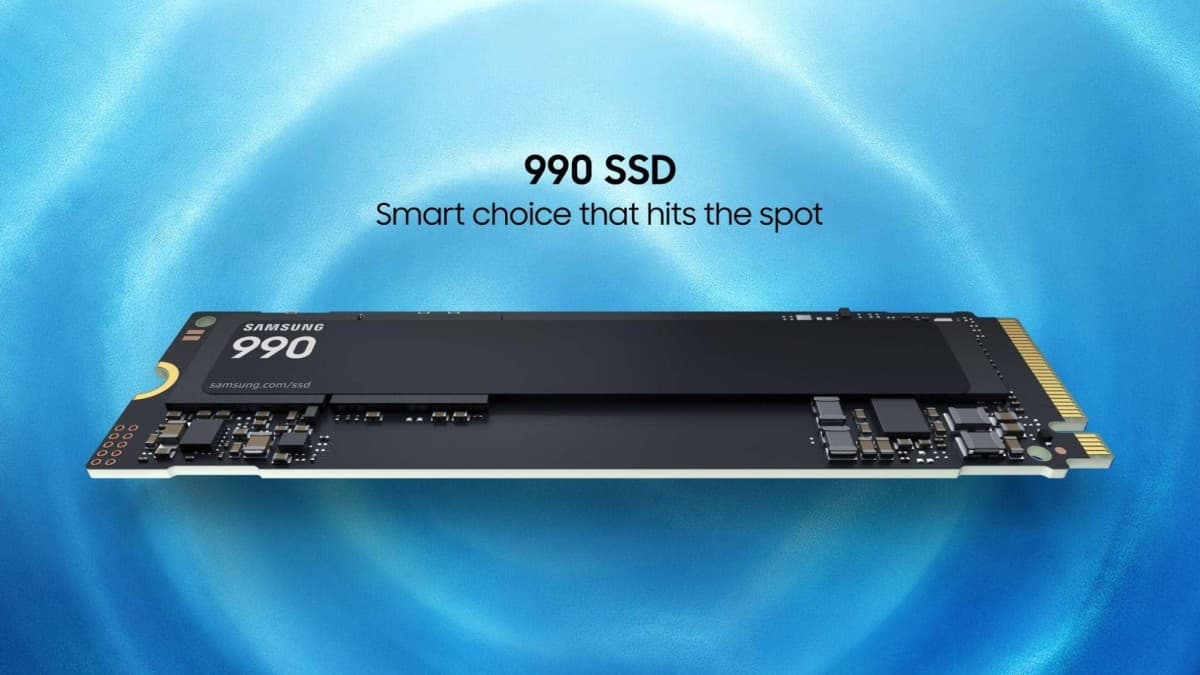
Samsung 990 SSD is the company's newest value-tier solid-state drive, and it arrives with an official Philippine price: ₱19,075 for the 1TB model and ₱37,678 for the 2TB model. Announced on July 14, 2026, the drive uses a PCIe 4.0 interface and reaches sequential read speeds of up to 7,250 MB/s. But it also makes real trade-offs to hit that price, so it is worth understanding what you actually get before you buy.
Key Takeaways
- The Samsung 990 SSD launched globally on July 15, 2026, in 1TB and 2TB capacities.
- Philippine SRP is ₱19,075 (1TB) and ₱37,678 (2TB); local sale is listed as "coming soon."
- It uses QLC NAND (memory that stores 4 bits per cell) and a DRAM-less controller.
- Read speeds reach up to 7,150 MB/s (1TB) and 7,250 MB/s (2TB) over PCIe 4.0.
- Warranty is 3 years, shorter than the 5 years on the premium 990 PRO.
Samsung 990 SSD specs at a glance
| Spec | 1TB | 2TB |
|---|
| Sequential read | up to 7,150 MB/s | up to 7,250 MB/s |
| Sequential write | up to 6,450 MB/s | up to 6,450 MB/s |
| Random read | up to 700,000 IOPS | up to 850,000 IOPS |
| Random write | up to 1.1M IOPS | up to 1.2M IOPS |
| Endurance | 400 TBW | 800 TBW |
| Warranty | 3 years | 3 years |
| US price | $269.99 (around ₱16,700) | $529.99 (around ₱32,700) |
| PH SRP | ₱19,075 | ₱37,678 |
The drive keeps the standard M.2 2280 form factor, and the interface is PCIe 4.0 x4 running the NVMe protocol. It is built on Samsung's in-house V9-series 280-layer 3D QLC NAND and is driven by a DRAM-less "Piccolo-Q" controller, according to TechPowerUp's launch coverage.
What QLC and DRAM-less mean for you
Two terms explain most of the price and the compromises here.
- QLC (Quad-Level Cell) NAND stores 4 bits of data in each memory cell. That makes it cheaper and denser than the TLC (Tri-Level Cell, 3 bits per cell) memory used in Samsung's pricier drives. The downside is that QLC is generally slower for long, sustained writes and wears out faster, which is why the endurance rating is lower.
- DRAM-less means the drive has no dedicated cache chip of its own. Instead it borrows a slice of your PC's system memory (a method called Host Memory Buffer, or HMB) to keep track of data. This lowers cost and power draw, but heavy multitasking and large file transfers can slow down compared with a drive that has its own DRAM.
Samsung places the 990 below the premium 990 PRO and the mid-range 990 EVO in its line-up. The company says the new drive is up to 38% more power-efficient than the 990 PRO, which is a genuine plus for laptops and small-form-factor builds where heat and battery life matter.
Performance: quick on paper, softer under load
The headline numbers are competitive for a PCIe 4.0 drive, but reviewers who tested it found the usual QLC pattern. In PC Perspective's review, write speeds dropped noticeably after the drive was filled and conditioned, though everyday tasks showed far less impact. The reviewer also noted weaker results at low queue depths, with the drive only catching up to higher-end models once the workload got heavier.
In plain terms: for gaming, general use, and moving reasonably sized files, it will feel fast. Push it with sustained, large writes on a nearly full drive and it will slow down more than a TLC drive would.
Endurance and warranty: the real catch
The biggest gap between the 990 and its siblings is durability. The 1TB model is rated for 400 TBW (terabytes written) and the 2TB for 800 TBW. By comparison, the TLC-based 990 EVO Plus is rated for 600 TBW (1TB) and 1,200 TBW (2TB). The 990 also ships with a 3-year warranty rather than the 5 years buyers may expect from Samsung's higher-end NVMe drives. For most home users these limits are far beyond normal use, but they signal where Samsung cut costs.
This launch follows a busy stretch of Samsung hardware news, including its Flex Titanium foldable display technology.
Samsung 990 SSD price and availability in the Philippines
The local pricing is already set: ₱19,075 for 1TB and ₱37,678 for 2TB. Both are higher than a straight conversion of the US prices ($269.99 is around ₱16,700 and $529.99 is around ₱32,700 at about ₱61.7 to the dollar), which is normal once taxes and local margins are added.
Samsung Philippines lists the drive as "coming soon," to be sold through the official Samsung Storage stores on Shopee and Lazada, plus partner retailers including PC Express, Infoworx, Octagon, The Net, JW Summit, PC Hub, Thinking Tools, Dynamic PC, DataBlitz, and Memo Express, based on local retail listings.
Should you buy it in 2026?
Here is the awkward part for value shoppers. This is a QLC, DRAM-less drive with a 3-year warranty, yet it launches at a price that would have bought a much stronger drive a year ago. Engadget points out that the non-Pro 990 is both slower and, at its launch price, more expensive than the original 2022 990 PRO was, and it ties the increase to the sharp rise in memory component costs during 2026 as AI data centers soak up NAND and RAM supply.
For a Filipino buyer, that means the 990's appeal rests on the Samsung brand, low power draw, and the promise of reliable everyday speed, not on being the cheapest gigabyte. If you write large amounts of data or want the longest warranty, the TLC-based 990 EVO Plus is worth comparing at local prices before you decide. If you mainly want a dependable PCIe 4.0 boot or game drive and you trust Samsung's support network here, the 990 fits, just go in knowing it is a value-segment drive at a premium-era price.
FAQ
Is the Samsung 990 the same as the 990 PRO?
No. The 990 PRO is the premium model with TLC NAND, its own DRAM cache, and a 5-year warranty. The plain 990 uses QLC NAND, a DRAM-less controller, and a 3-year warranty, and it is slower in sustained writes.
When is the Samsung 990 SSD available in the Philippines?
The SRP is already announced (₱19,075 for 1TB, ₱37,678 for 2TB), and Samsung lists local sales as coming soon through official Shopee and Lazada stores and partner PC retailers.
Is QLC storage bad?
Not for typical use. QLC is cheaper and denser but has lower endurance and slower sustained writes than TLC. It is fine for gaming and general storage; heavy, constant writing is where the difference shows.